One registry, as many plans as you need
The idea of a land registry (cadastre in French): the facts are written once, and every map is drawn from them. A network diagram, a flow diagram and an application map stop being three files that drift apart.
The registry .ca
What exists, what contains what, who talks to whom and what goes through: sites, subnets, servers, clusters, apps, jobs, databases, SaaS, data, teams, processes.
The views .cav
Select, filter, group and project the facts, then render them: SVG, Mermaid, sequence diagrams, draw.io, tables, text. Each view is laid out several ways and the most readable drawing is kept.
The checks .cac
The rules the facts must follow, run like tests by cadastre check and shown in the editor: every system has an owner, every app runs somewhere.
One model, three audiences
The same compiled model, for the people who write it, the people who read it, and the tools that need it.
Those who write it
The playground in the browser, the VS Code extension and the IntelliJ plugin with live previews, the language server behind them, the cadastre command line, and an MCP server for AI agents. Diagnostics, completion, navigation, renaming, formatting.
Those who consult it
The site published by cadastre site, for readers who will never open a .ca file: a page per view and per resource, diagrams leading to the resources, search, the results of the checks. Static, for any intranet.
Those who integrate it
A static JSON API beside the site, api/: a record per resource and per view, the links, the checks. Feed an intranet page, a form, a security assessment tool or a dashboard, without a server. The JSON model.
Command line: check, build, fmt, site, serve; imports from a Terraform state or a CSV inventory; exports to ArchiMate, GraphML and JSON.
A small example
The project of the tutorial: one site, one system, its flows. Its apps view is five lines, and the compiler draws the diagram from them.
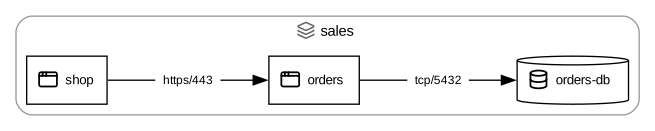
apps view, as cadastre site publishes it. Edit it in the playground.team ops
team sales-team
site dc1 {
hosting: on-prem
owner: ops
network lan {
subnet apps {
cidr: 10.0.1.0/24
server web01 { ip: 10.0.1.10 }
server db01 { ip: 10.0.1.20 }
}
}
}
data order
system sales {
owner: sales-team
app shop {
on: web01
-> orders : https/443 [flow] { carries: [order] }
}
app orders {
on: web01
-> orders-db : tcp/5432 [flow] { carries: [order] }
}
database orders-db { on: db01 }
}
view apps {
  title: "Applications"
  select app, database group-by system
  edges  [flow]
  render svg, text
}

// The flows between apps, lifted onto the servers they run on.
view servers {
  title: "Servers"
  select server group-by site > subnet
  edges  lift([flow], via: on)
  render text
}

// Where an order goes, step by step, from the shop.
view order-path {
  title: "Order path"
  select app, database without isolated
  edges  follow(order, from: shop)
  render text { edge_labels: [step, port] }
}
check owned {
  select system where not exists(owner)
  expect none
  message: "every system has an owner"
}
What it works out for you
The registry holds the facts you know; the compiler derives the rest, in every view that asks for it.
Lifted flows
The flows between servers, subnets or sites, from the flows between the apps they host: lift([flow], via: on).
The path of a data object
Where a piece of data goes, step by step, from where it is produced: follow(order, from: shop).
Failures
What becomes unavailable when a resource fails, alone or in pairs (what a redundancy really rests on), or in a scenario of your own, drawn in red.
Network paths
The route of a flow through the network devices, deduced from the cabling.
Egress and ingress
What leaves the network and what comes in, with the data it carries.
Partial knowledge
Confidence, open questions, incomplete elements: a model can say what is not known yet, and what is left to check.
Close to C4, with a compiler
If you know the C4 model and Structurizr, Cadastre will feel familiar: one model, many views, relations written with ->. It takes the idea elsewhere.
What it shares with C4
- A model written once, views drawn from it.
- Elements nested in one another, relations between them.
- Text in Git, reviewed like code.
Where it goes further
- A compiler: typed keys and references, diagnostics, checks run like tests, derived flows, paths and failures.
- The technical map of an information system, not only software architecture: sites, subnets, racks, firewalls, tunnels, schedulers, SaaS, teams.
- Views as queries: select, filter, group and lift instead of listing what each diagram shows.
Examples
Each one is published with cadastre site, exactly as a team would publish its own project for its readers, with its JSON model under api/. Or open it in the playground, as its authors do: it compiles in your browser, nothing is uploaded.
Tutorial
The small project above: a site, a system, four views, a check.
Retail
A realistic, anonymized mapping workshop: four systems, two sites, SaaS, a file hub, a Kafka topic, business processes.
Reference
The complete example of the guide: every construct of the language, from racks and VPN tunnels to checks.
Install
Binaries for Linux, macOS and Windows, and the VS Code extension, are on the releases page. Or build it with Rust:
cargo install --git https://github.com/Jbbouille/cadastre cadastre-cli
cadastre init my-system
cadastre check my-system/src
SVG needs Graphviz on the PATH. Cadastre is 0.x: until 1.0 the syntax may still change, with the old form reported by the compiler.